Guidance on How to Use Customized Package

Note:Please make sure that you have authorized your store, connected the products in your store or finished sourcing in CJ before you want customized packaging.
1. Check how many kinds of customized packaging CJ has
My CJ---Customized Package
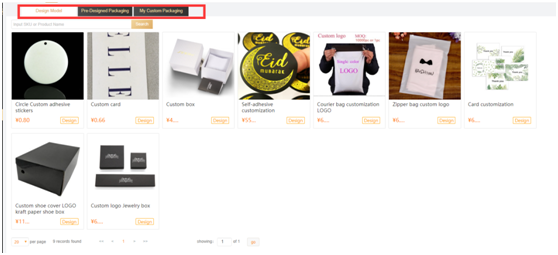
There are three categories of customized packages,
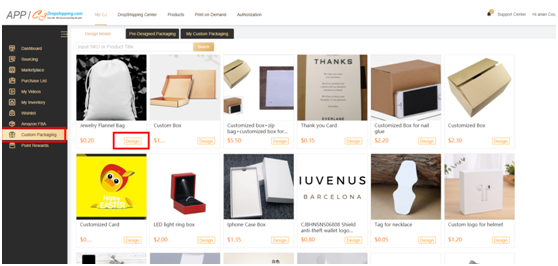
A. Design Model; here you can add text or logo on your preferred package.
B. Pre-Designed Packaging; here are the pre-designed package and you can purchase your preferred ones.
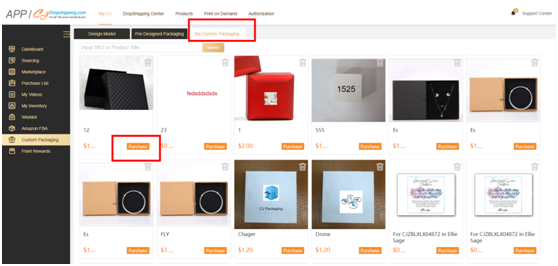
C. My Custom Packaging; Your design will be here after you have added the text and logo on the package in Design Model. And you can purchase them here.
D. You can contact your agent or our customized package agent to check if there is more package you want.
Chat room: http://chat.cjdropshipping.com
Customized package agent: https://app.cjdropshipping.cn/register.html?ma=Anna
2. After you have finished design, you can purchase your package.
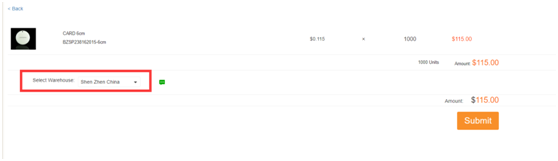
General goods are usually stocked in Yiwu warehouse and products with other attributes (such as electric products or liquids) are usually stocked in Shenzhen warehouse. If you are not sure, please ask your agent or the customer service in the chat room.
Note:
A: When you are choosing the warehouse for your package, please choose the same warehouse of your products.
B. What if you choose the wrong warehouse for the package? Don't worry, you can open a dispute and set a new order.
C. Purchase the package, we suggest you order in large amounts to save time. After you have paid for the package, you don’t need to pay for the package again when you set an order in CJ.
3. After you have finished the payment, you can see the order status in My CJ—Purchase list and the details of your customized package inventory in My inventory---Package inventory.
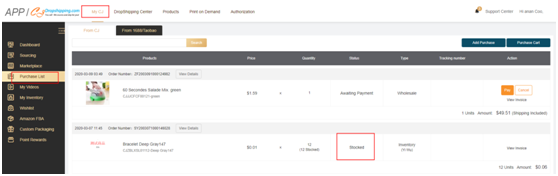
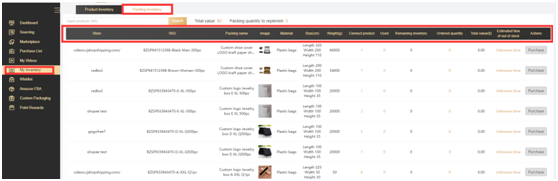
4. Connect the customized package with products in your store.
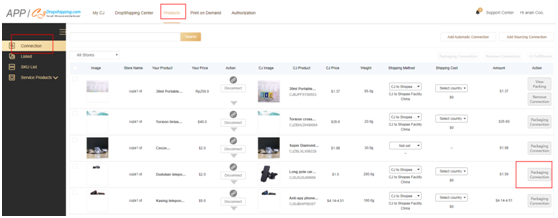
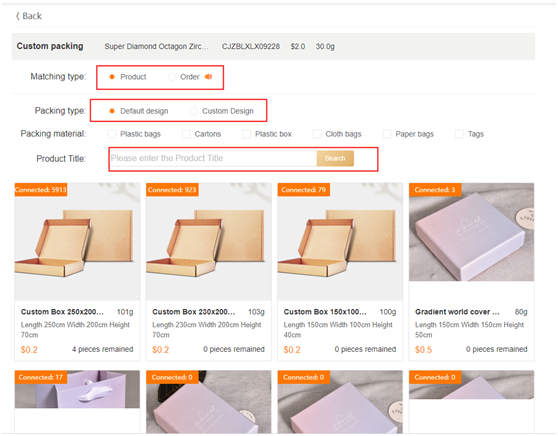
Matching Type:
A: Product; It means that this package is connected with every single product in one order. For example, if there is two pcs of this product, then this order will use 2 pcs of this package.
B: Order; It means that this package is connected with only 1 pc product in one order. For example, if there are two pcs of this product, then this order will only use 1 pc of this package.
Package type:
A: Default design: means the pre-designed package;
B: Custom Design: means the package that you designed.
You need to first connect your customized package with the products in your store so that the products you order will be packed with your designed package.
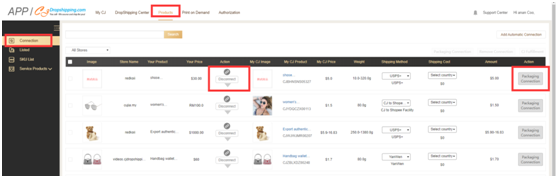
Go to Product---Connection---Choose your store---Package connection to connect the package. You can choose to connect either one or all variants of the products.
Note:
Only when the product and the packaging material are in the same warehouse can the package inventory is deducted and can the package exist in your order. So if your package hasn’t arrived in our warehouse, there won't be any package in your order even if you can see it in your order before you pay for it.
General process: Design packageàPackage connectionàPurchase packageàWait the package to arrive at our warehouseàAdd the order into cart and pay for the order
5. What if there isn't your preferred package in our system?
You can contact your agent or the customized package agent and tell him or her about your preferred package. Then he or she will come to our supplier and check if there is one you want. After that, your agent will confirm with you about the price, MOQ and other package details. If you like it, your agent will add it to our system. The following procedure will be the same as the above.
6. What if the number of the package you want doesn't reach the requirement of MOQ?
After you have finished your design in our system, there will be a unique SKU of this design. Or before the design, you can ask your agent if it’s OK to order the package in a small amount. And if it's feasible, your agent will modify the MOQ of this package, and then you can buy that.
Note: We recommend you to order package in large amounts since it's more economic.
7. Will there be customized package in an excel order or “create orders”?
For now, the package inventory can be deducted in an excel order (as long as there is package inventory and your product has been connected with the package). However, if you create orders manually, there won’t be a package in this order.
8. Can I combine orders or split orders if this order has a customized package?
For now, it's not possible. Sorry for the inconvenience. But our IT team is working on it.
9. When you purchase the package, please choose the 1 pc variant, and don't choose the 500 pcs or 1000 pcs variant because that would cause the extremely high shipping cost in one order.
10. Is it possible that one specific package is only open to me?
Sure. You can tell your agent or our customized package agent or customer service to set the package in our system.
11. Have you got familiar with the whole process of our customized package service? If not, feel free to comment on this article.
- 111
- 1
- 2
- 1